
Users may realise creative designs with laser cutting technology for shaping the materials and laser engraving for removing layers of the materials. Inside LU Barn (Makerspace) Maker Room (1/F Zone A) , a laser cutter/engraver is installed to provide eligible users with laser cutting and engraving services.
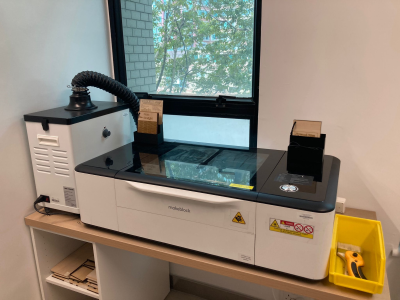
Laser Cutter/Engraver Specifications & Templates
| Model |
GCC Mercury III |
| Main Functions |
Laser Cutting, Engraving |
| Laser Tube Type and Power |
CO₂ Laser 30W |
| Work Area |
635 X 458mm |
| Material Dimensions (Supplied by the Library) |
Plywood 420 X 297mm (thickness 3mm, 5mm)
Acrylic (clear) 450 X 300mm (thickness 3mm, 5mm) |
Templates
AI (Adobe Illustrator) Format |
Plywood
Acrylic |
Rules
Please make a booking through the Library Rooms/Facilities Booking System.
| Eligible Users: |
Staff and Student |
| Quota: |
- 2 sessions per day (maximum 1.5 hours per session)
- 4 sessions per week
- Reset on Sunday
|
- Unauthorised use of the Laser Cutter/Engraver is not allowed. Please book the service via the Library Rooms/Facilities Booking System.
- The Laser Cutter/Engraver should be switched OFF when it is not in use, and the air purifier must be switched ON when the Laser Cutter/Engraver is operating.
- Users could only use the Laser Cutter/Engraver under the supervision of Library staff.
- Users should not look directly into a laser beam when the Laser Cutter/Engraver is operating.
- The cover of the Laser Cutter/Engraver should be closed when it is in operation.
- Users should not leave when using the Laser Cutter/Engraver.
- Users must use materials provided by LU Barn (Makerspace) or approved by Library staff.
- The size of the print objects must lie within the scale and proportion assigned by the Library.
- Violation of the Library Regulations will result in the suspension of Library privileges including access to facilities and resources, or disciplinary action.
- Library Regulations are subject to change without prior notice.
|
Instructions
Users can use vector editing software Adobe Illustrator, to create artwork for laser cutting and engraving. The Library offers PCs and iMacs equipped with Adobe CC that users can utilise for their projects.
The Laser Cutter/Engraver ONLY accepts file format in .ai. Users must prepare their files in advance and save them on a USB drive or online before starting the laser cutting/engraving process.
| Please follow the recommended file specifications for Adobe Illustrator below: |
- To engrave an image, use black and white images.
- Set the document colour mode to RGB.
- Save the file in Adobe Illustrator CC (2020) format to avoid file conflict.
- Leave at least 5mm margins from all edges of the artboard.
- Set the stroke weight for cut lines to 0.001 pt.
- Convert all text to outlines.
- Do not create a clipping mask.
- Avoid duplicating paths, as the same path will be cut multiple times.
- Include all linked files when saving the file.
- The templates with guidelines provided by the Library can be referenced.
|
Users can refer to the material test boards for reference results of different settings on the laser cutter/engraver.